Soyeon Yun
UX/UI
Other Work
About
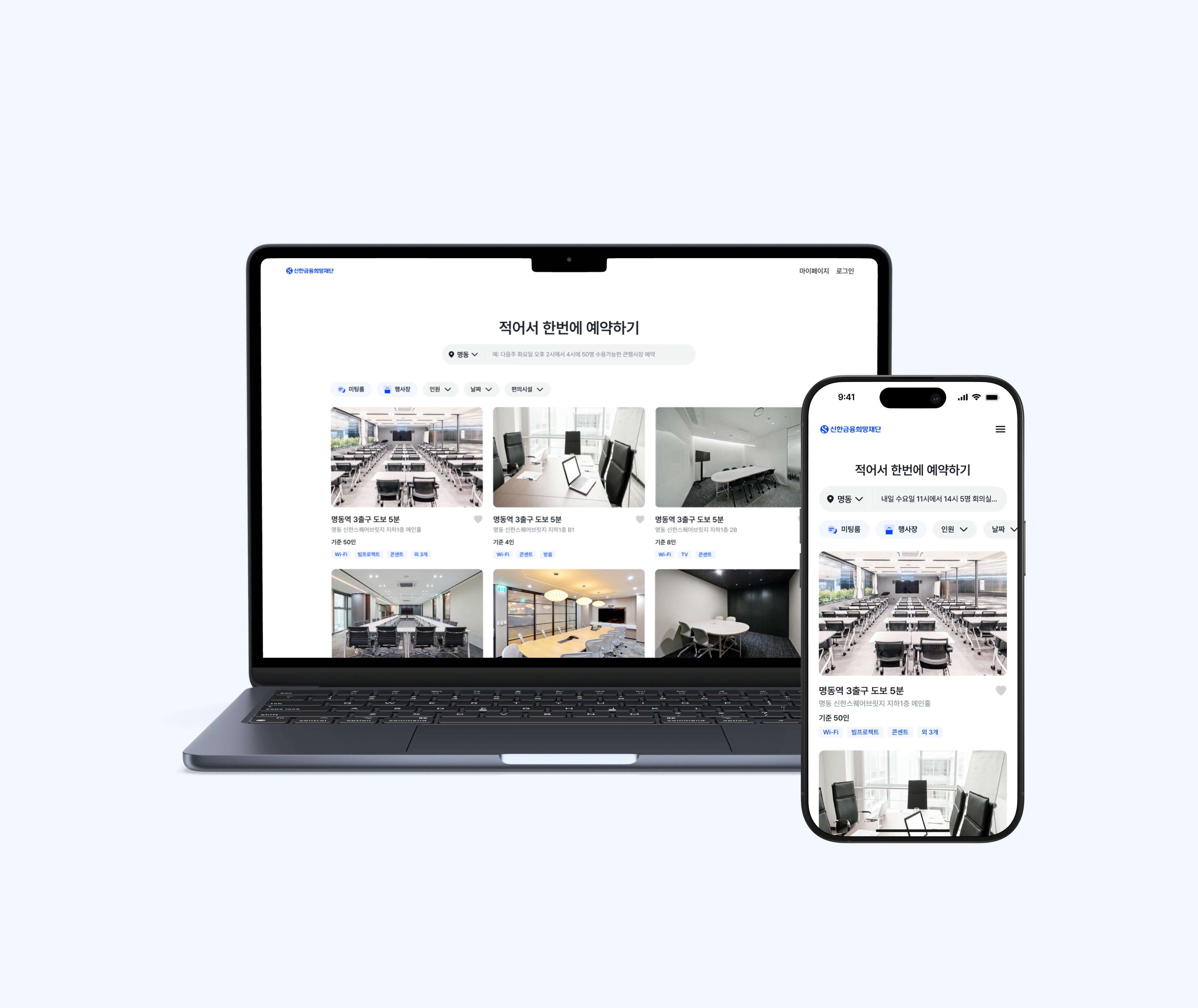
Reinventing Corporate Bookings with AI: 88% Faster
Shinhan’s space reservations were previously managed through long email chains, causing delays and confusion for both users and administrators. As the sole designer, I collaborated with three developers to reimagine this process from the ground up. We introduced an agent AI for streamlined booking and transforming a frustrating experience into an efficient, future-ready platform.
Year
Company
2025, 6 weeks
Shinhan Foundation
OS
Role
App, Web
Product Designer (100%)
Problem Finding
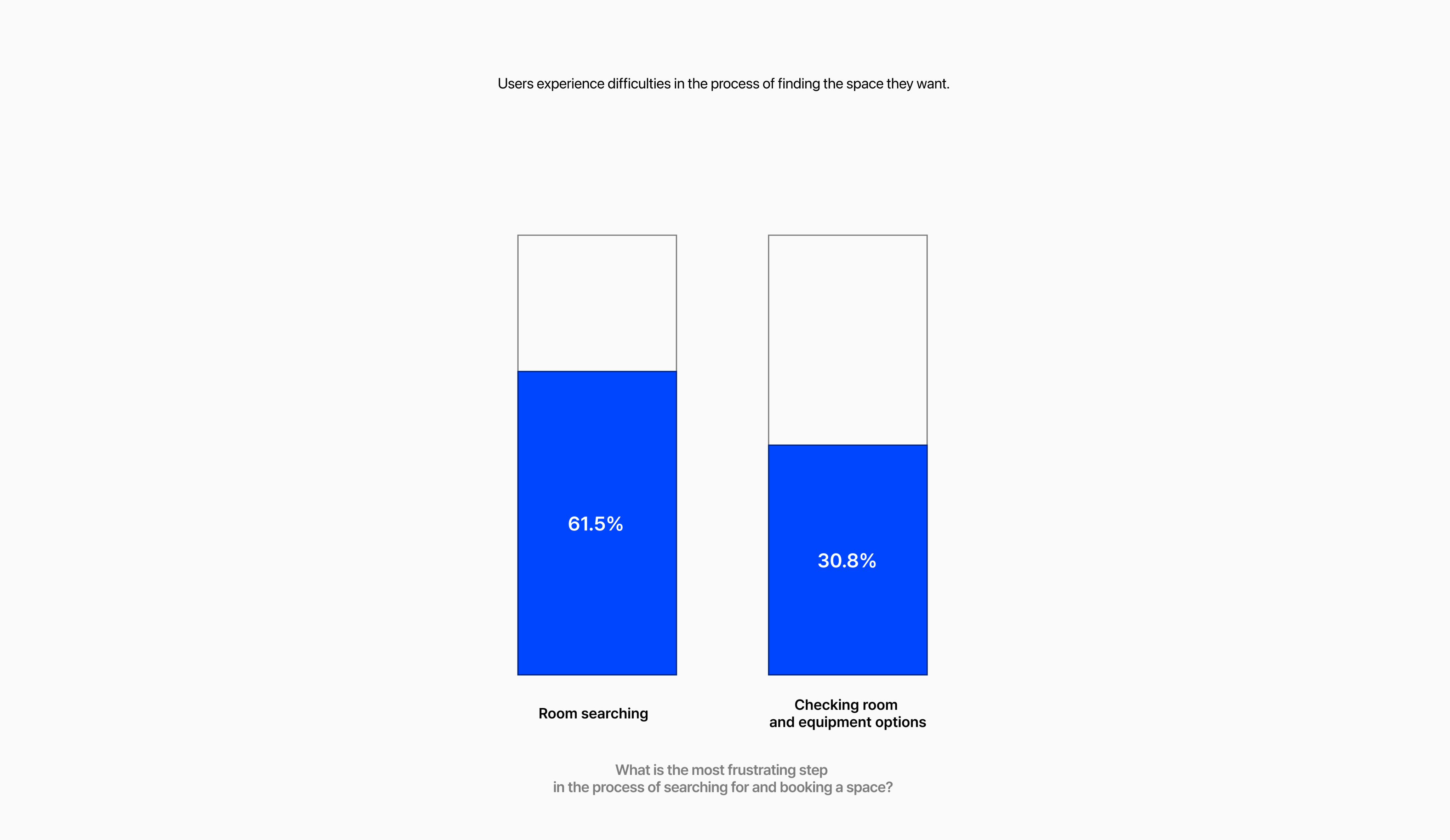
Users struggle to find spaces that meet their needs
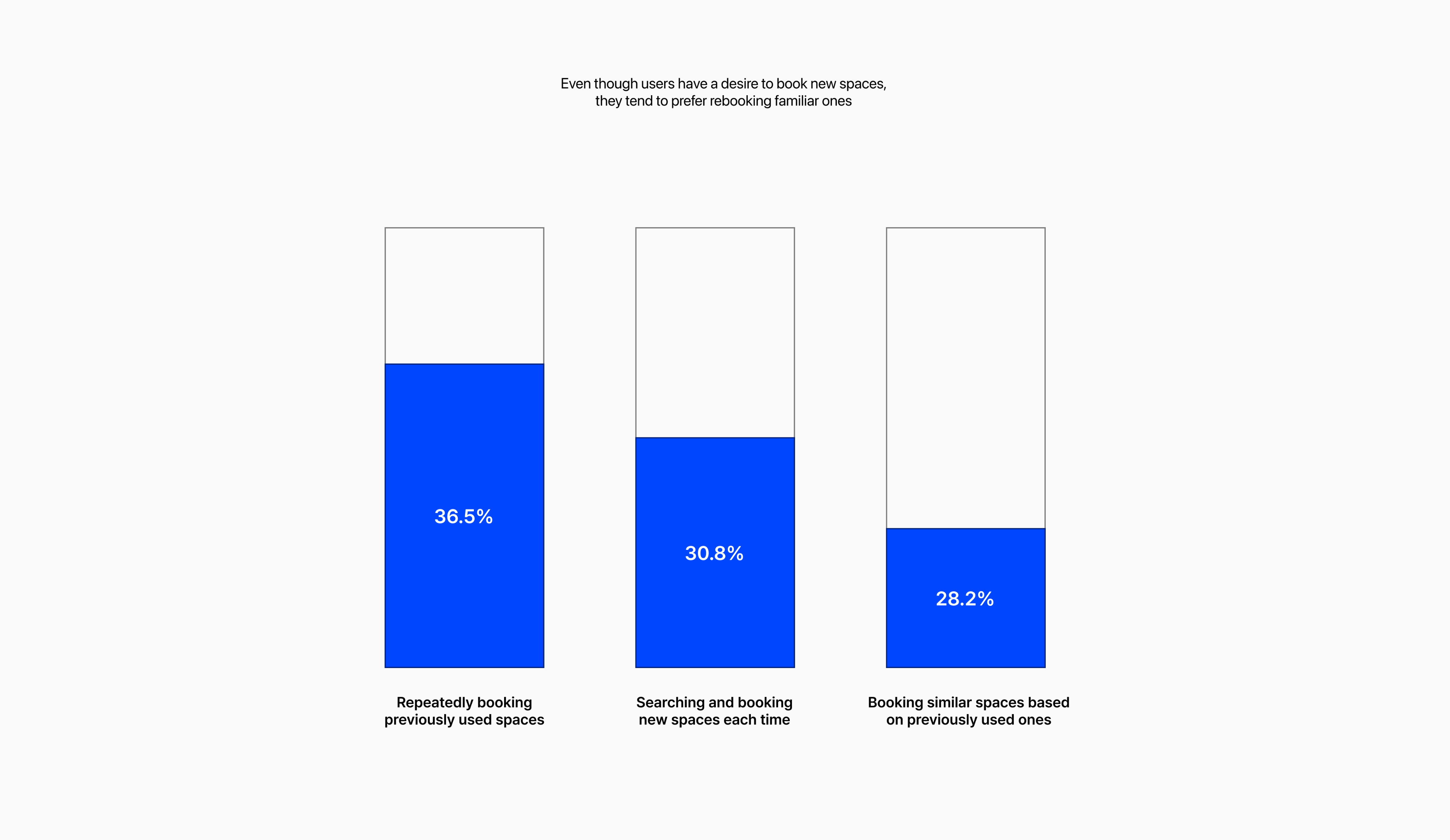
I conducted a survey with 40 respondents to understand their booking behavior.
While many users expressed a clear interest in exploring new spaces, they often ended up rebooking familiar ones due to the complexity of the search process. Most users felt that rebooking was a more efficient and safer choice since they already knew details like the room size and available amenities.
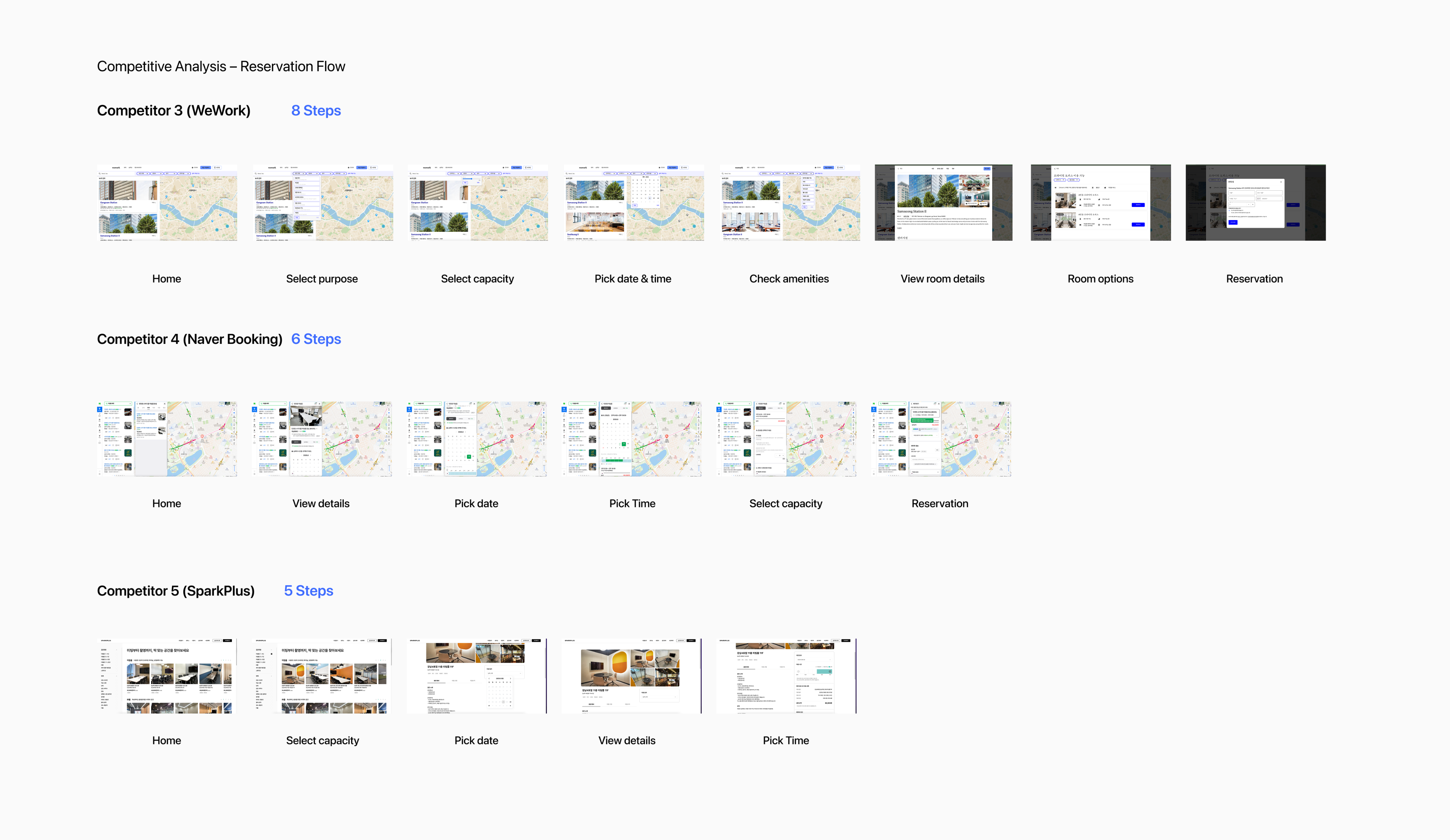
Problem Statement 1 – Why users found exploring new spaces cumbersome?
The customer journey to find a suitable space is too long
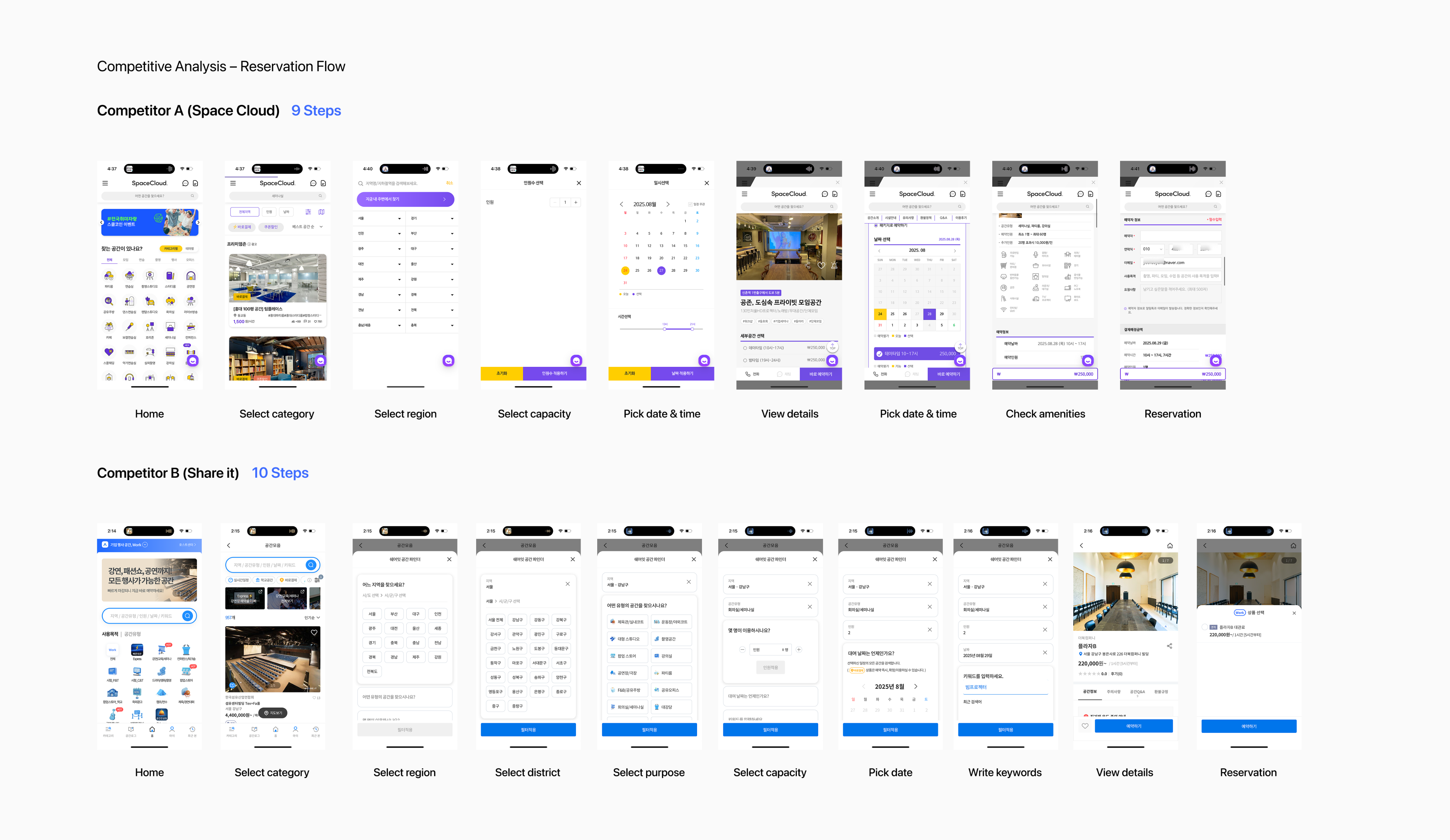
Through competitor research, I analyzed why users find the space search process so difficult.
The findings showed that competitor flows take an average of 8 steps just to search and reserve a space. This long and fragmented process forces customers to go through multiple layers of selection before reaching a suitable option, making space search the most frustrating part of the journey.
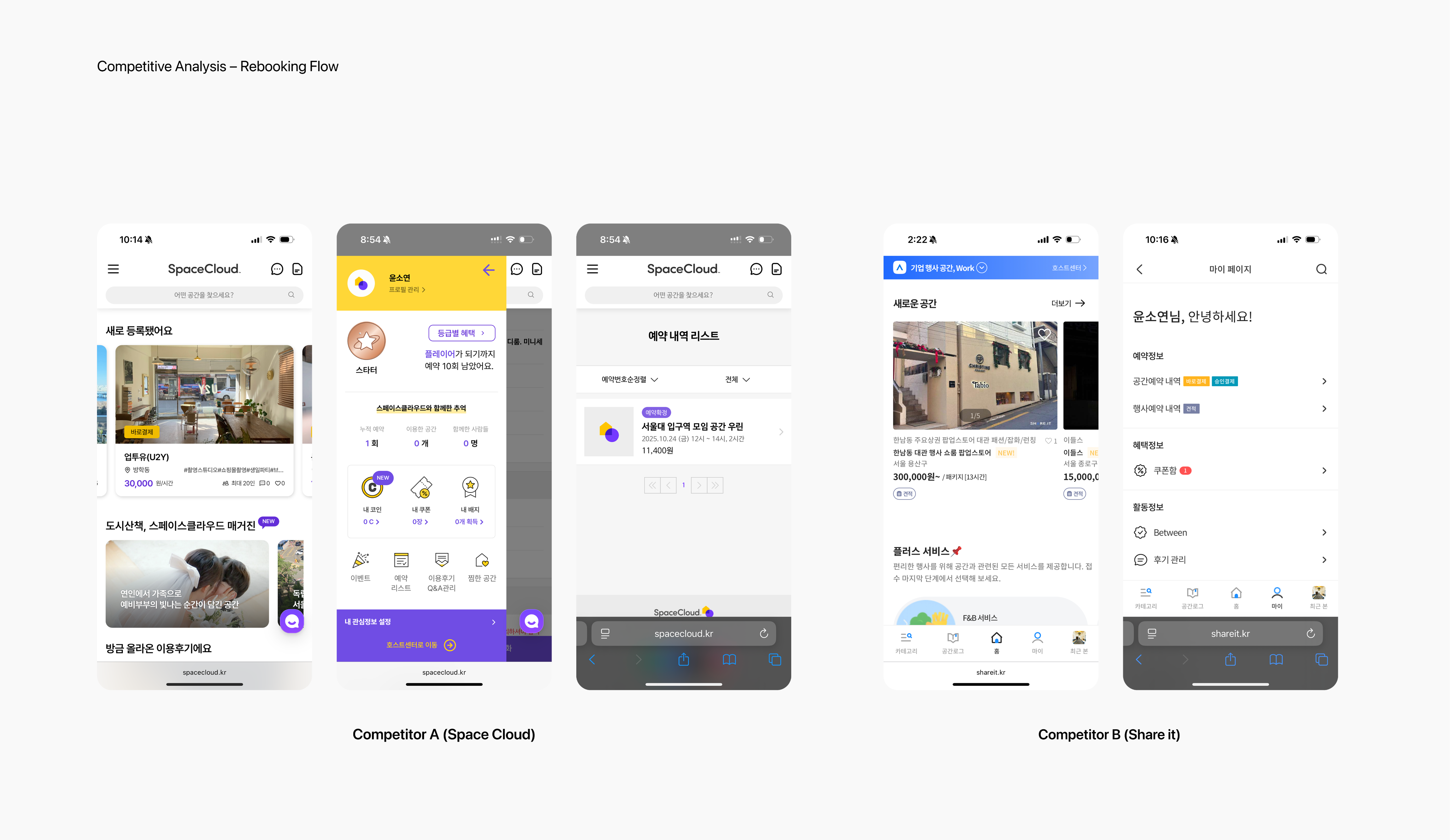
Problem Statement 2- What makes users feel frustrated when rebooking?
Rebooking was cumbersome without past-booking suggestions
Users couldn’t get recommendations for frequently used or similar spaces, forcing them to go through their booking history every time they wanted to rebook.
Additionally, they couldn’t easily check key details such as distance, capacity, or amenities without entering each space’s detail page.
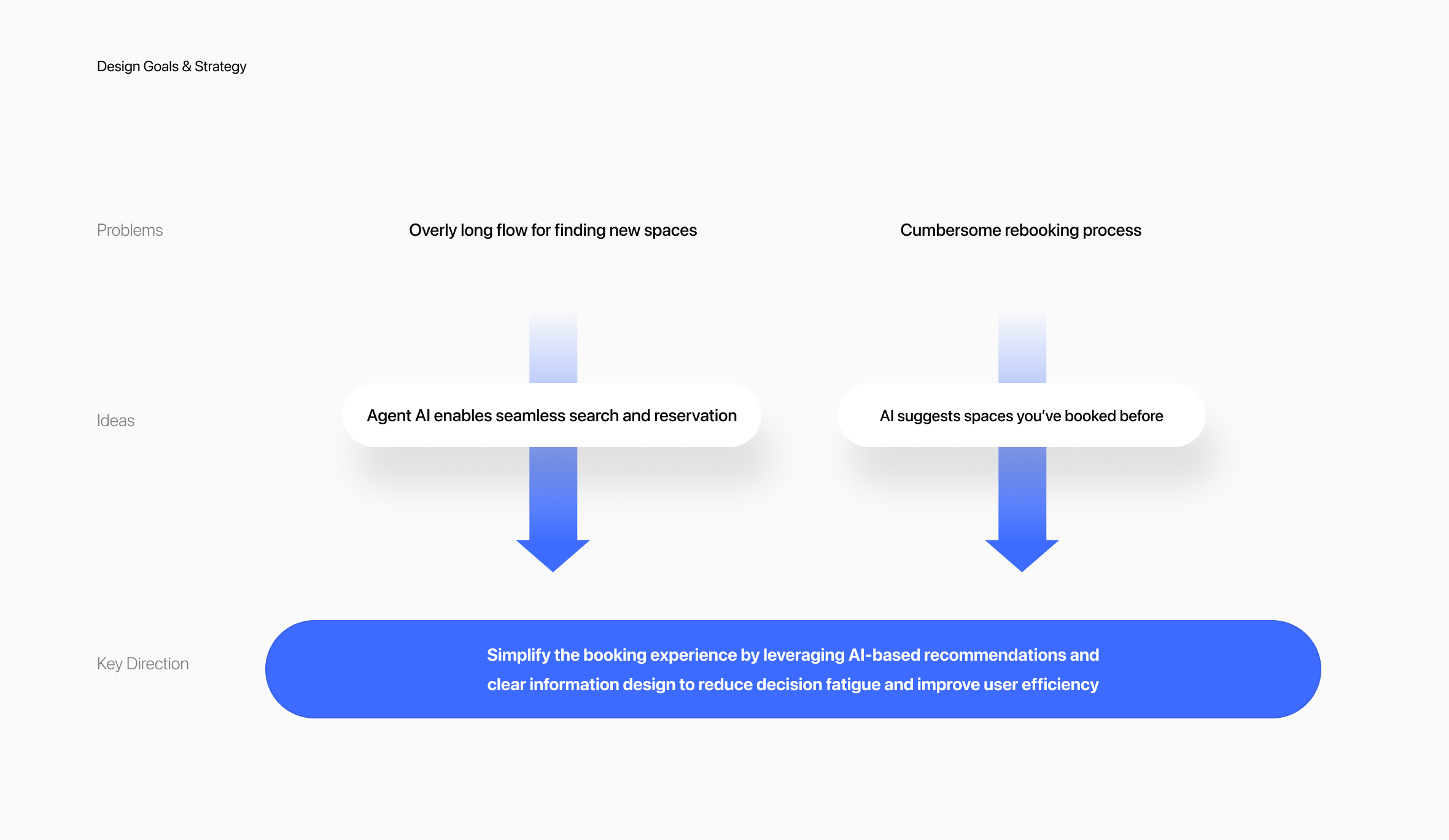
Design Goals & Strategy
Simplify the booking experience by leveraging AI-based recommendations and clear information design to reduce decision fatigue and improve user efficiency
To address both the overly long flow for finding new spaces and the cumbersome rebooking process, I focused on simplifying the overall booking experience through AI and clear information design.
Agent AI enables seamless search and reservation by minimizing steps and automating data entry, while AI-based recommendations suggest frequently used or similar spaces to make rebooking faster and more personalized.
By combining these two approaches, the design aims to reduce decision fatigue, shorten the booking process, and improve overall user efficiency.
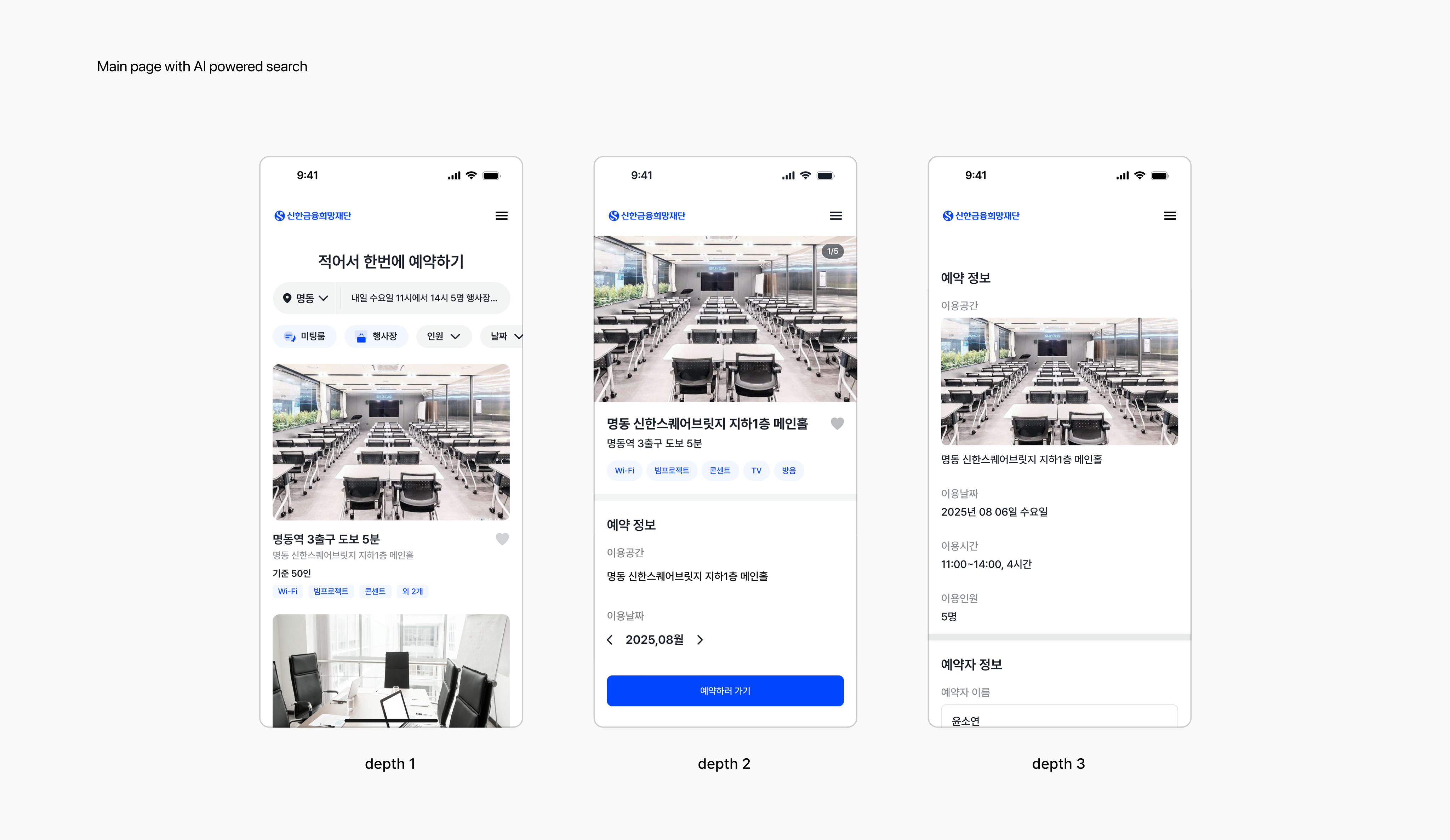
Main page with AI powered search
Agent AI for Fast, Effortless Business Space Reservations
I identified the 8 step reservation flow as the biggest pain point and simplified it into a three step journey with agent AI. The system now auto-fills reservation details, enabling users to complete bookings with a single confirmation.
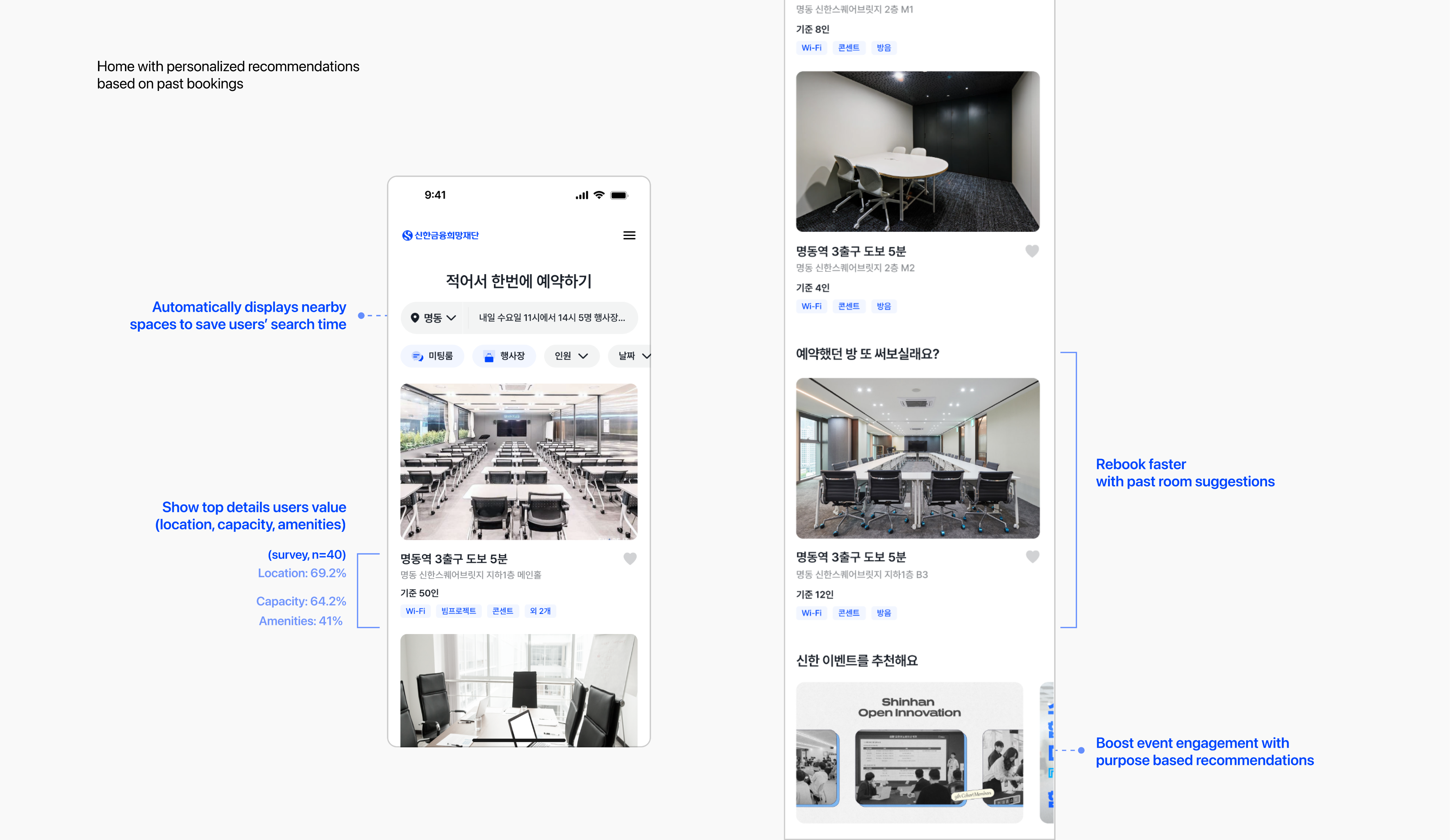
Home with personalized recommendations based on past bookings
Reducing decision fatigue through past-booking-based recommendations and information design
AI recommends spaces based on users’ past bookings and presents key information clearly, helping reduce decision fatigue during the booking process
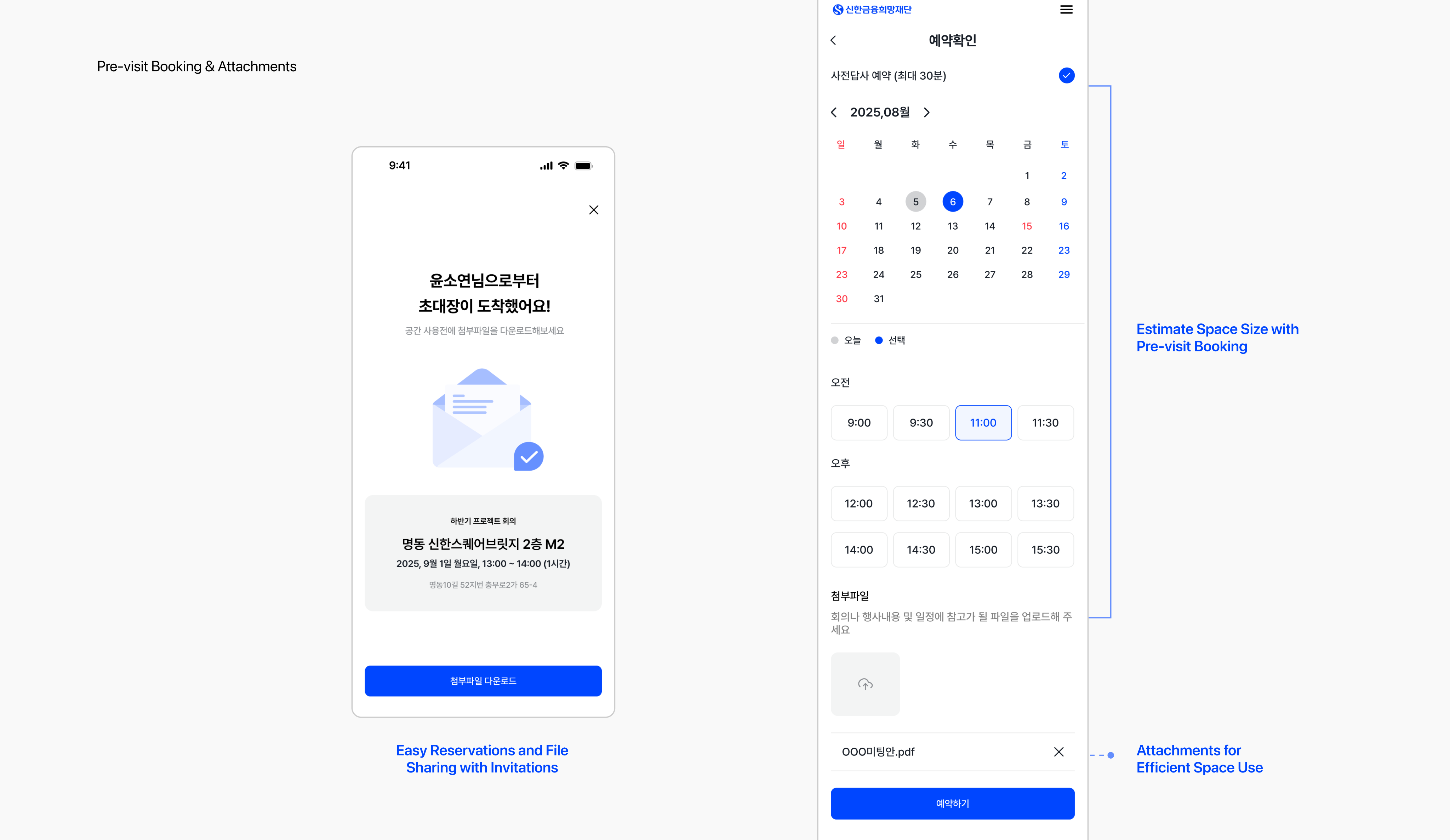
Pre-visit Booking & Attachments
Efficient Meetings and Events with Files & Pre- visit
Based on survey insights, we identified another major pain point: the difficulty for users to estimate space size before booking. Since many companies use the service for events, I introduced a pre-visit reservation feature that allows users to preview the actual space size before committing.
I also addressed the challenge of sharing materials for efficient meetings and events. To solve this, we enabled file attachments within reservations and provided invitation links so team members could easily access shared documents. These solutions not only improved usability but also supported smoother collaboration and more effective event planning
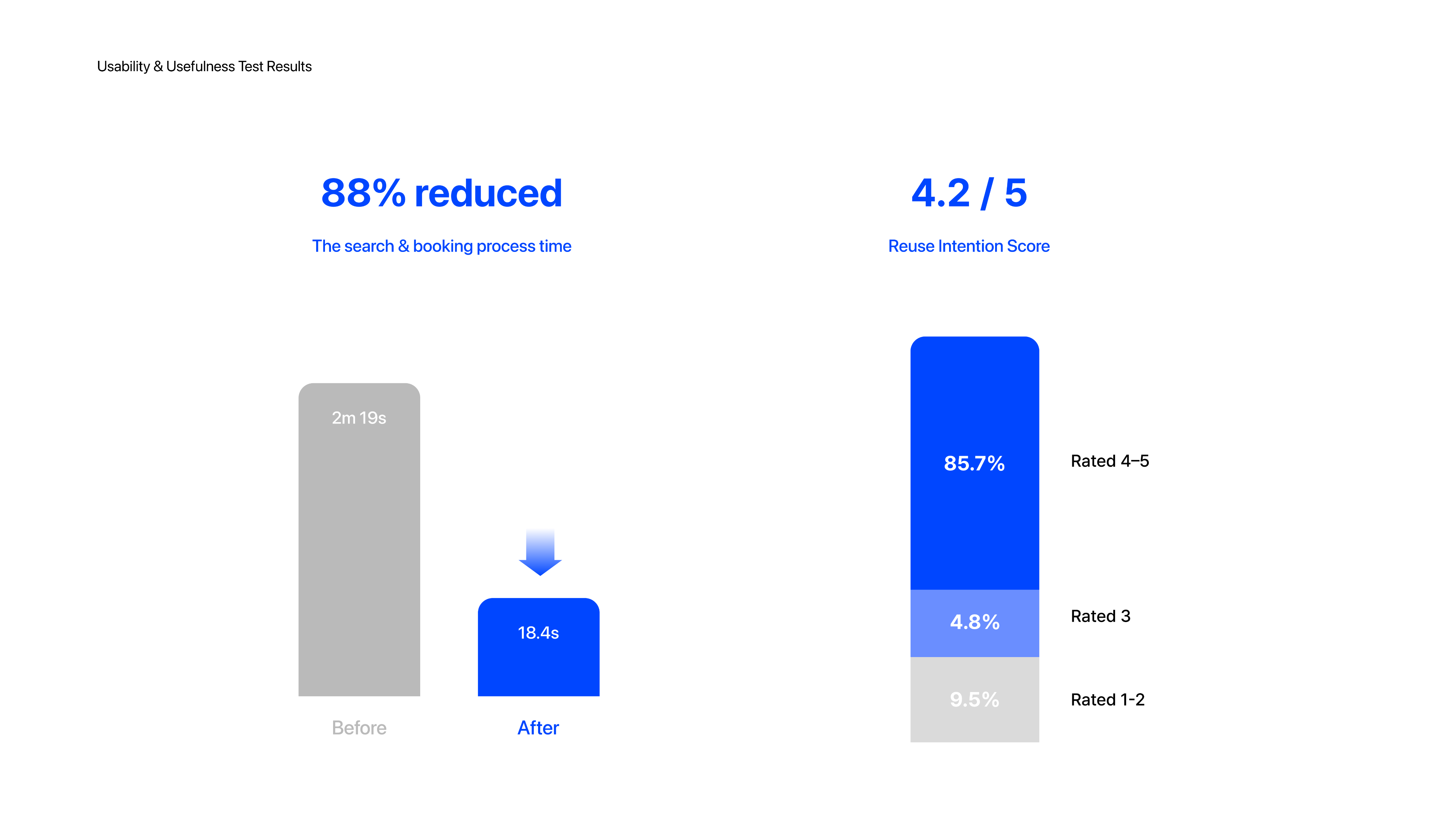
Usability & Usefulness Test Results
Users Want to Use It Again
Participants
- 21 participants mainly office workers experienced in space booking
Objective
- To evaluate the usability and usefulness of the AI-powered search & booking feature.
- Specifically: Does the feature reduce booking time and feel valuable enough for reuse?
Results
- Reduced booking time by 88% (2m30s → 18.4s)
- Reuse Intention Score 4.2 / 5 (85.7% rated 4–5)
- Users praised the speed and convenience, but noted frustration when results couldn’t be modified
Key Issues
- When results didn’t meet expectations, users preferred re-entering queries over adjusting auto-filled filters, leading to frustration
- Long text input caused fatigue
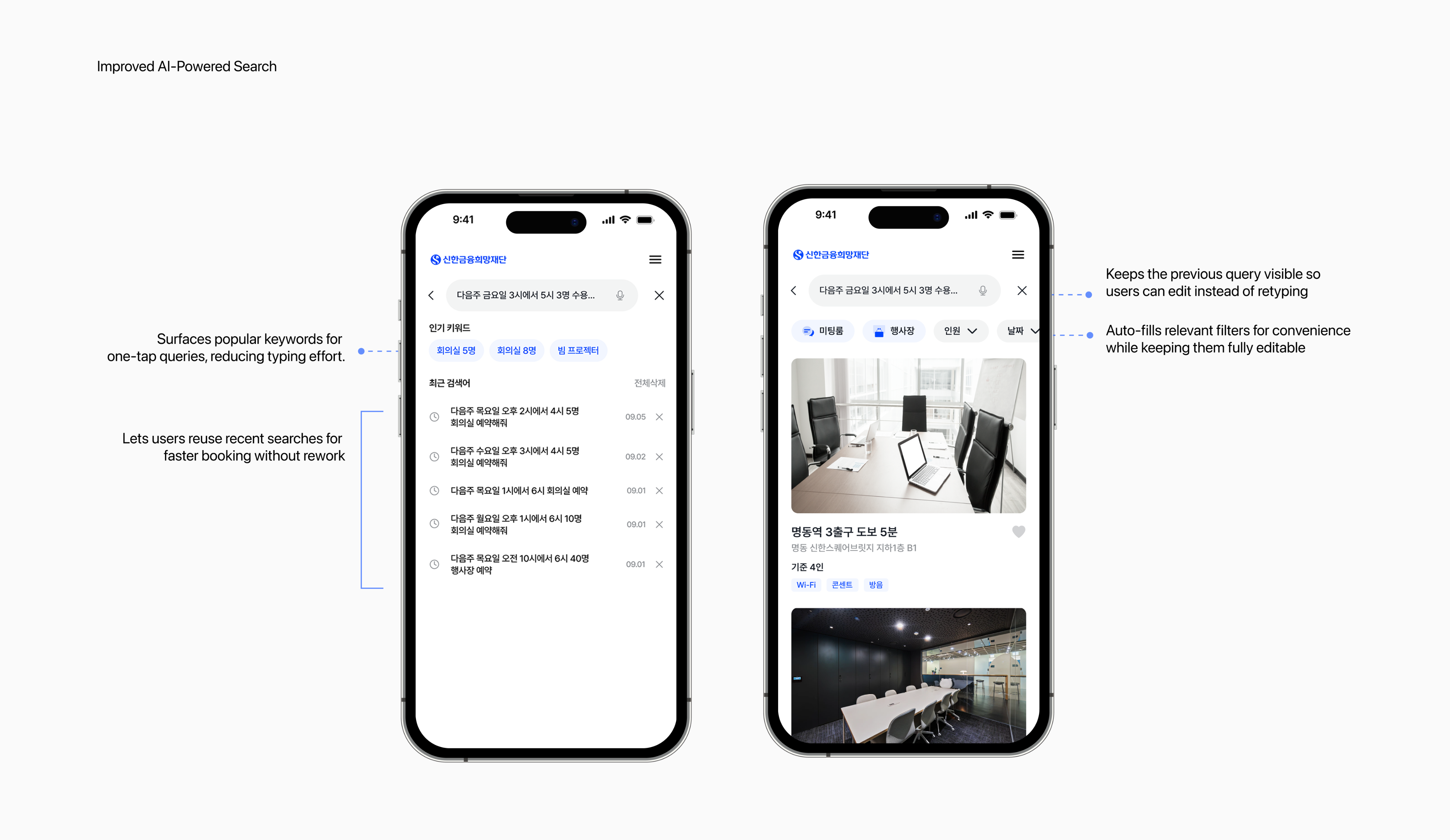
Design Proposal
Improved AI-Powered Search
Based on usability testing, we found that when results didn’t meet expectations, users preferred re-entering queries over adjusting auto-filled filters, which led to frustration.
To address this, I designed an improved AI-powered search and booking flow. The new design reduces effort by surfacing popular keywords for one-tap queries, enabling users to reuse recent searches, keeping previous inputs visible for easy editing, and auto-filling filters for convenience while still allowing full control.
Design Proposal
Not just cute, but problem-solving
To reduce fatigue from long text input, I introduced voice AI for booking.
When users faced new issues such as misheard commands and unclear voice-only results, I proposed two improvements: a character-driven voice interaction for empathetic error handling and a card-based result for instant visual clarity.
Created the character and prototype video using ChatGPT and MidJourney to quickly visualize the concept.
Flow Chart
Rapid Flow Chart with Figma Jam AI
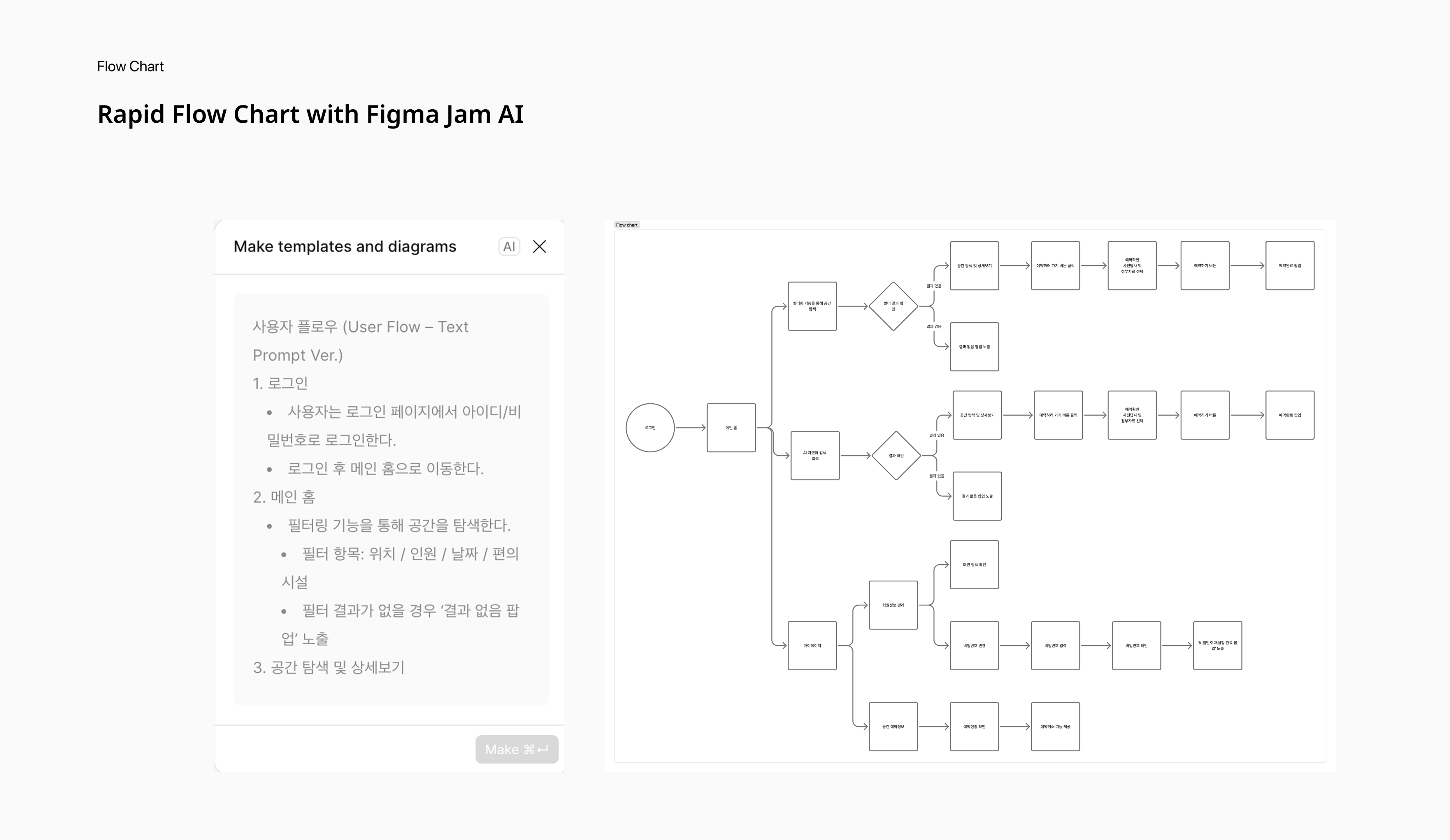
During the design ideation stage, I leveraged Figma Jam AI to rapidly generate user flowcharts and visualize complex service structures.This approach significantly reduced collaboration time and helped the team focus on solving real user pain points rather than manual documentation.
Wireframe
From UX Requirements to Rapid Wireframes with Figma Make
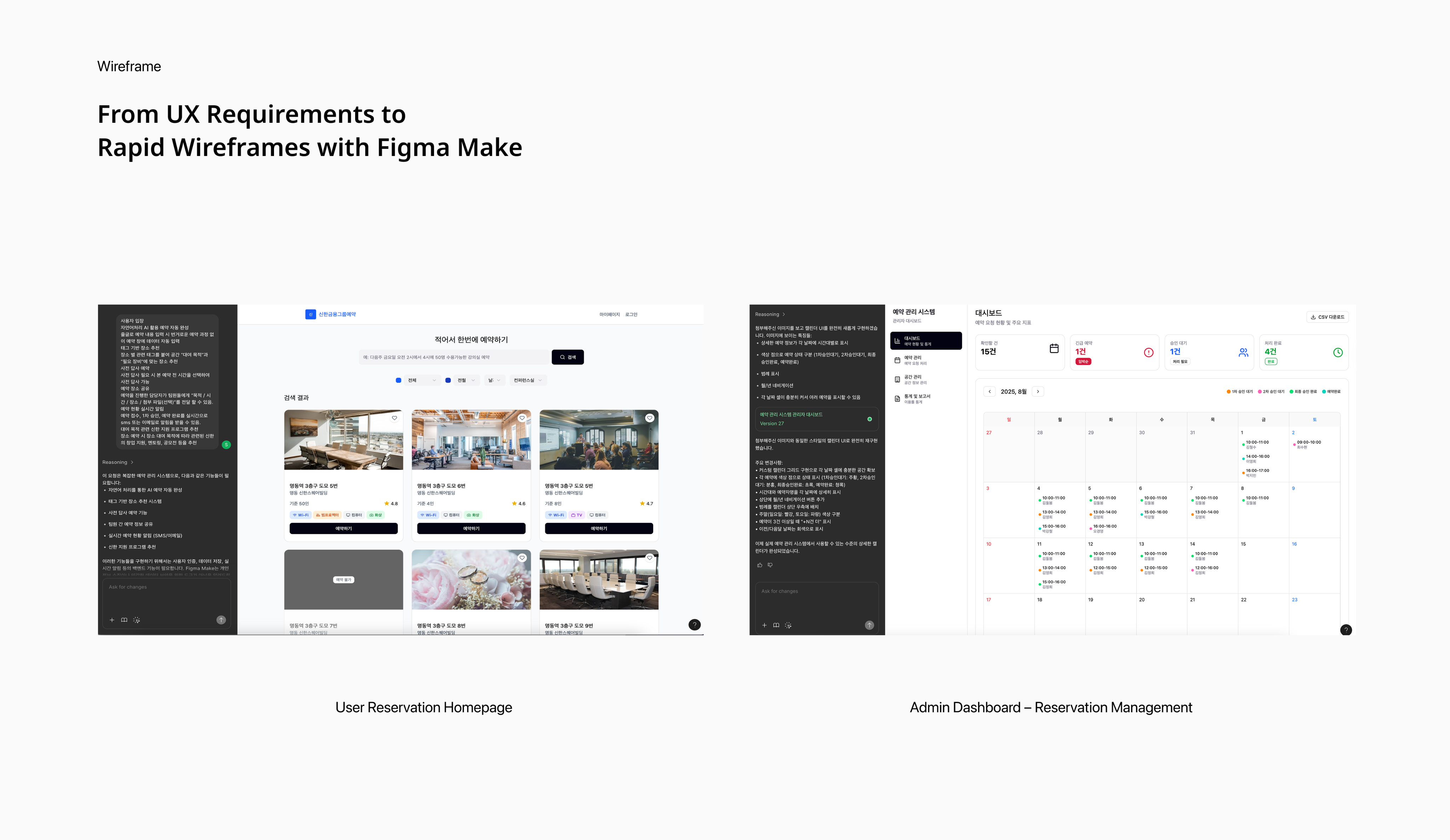
Applied Figma Make to translate UX requirements into rapid wireframes, enabling quick ideation, user flow validation, and iterative prototyping. This accelerated early design cycles, fostered closer collaboration with developers, and provided a clear bridge from design concepts to implementation-ready solutions within a short-term project.
Admin page Wireframe Link
Design System
Consistency in Design, Clarity for Development
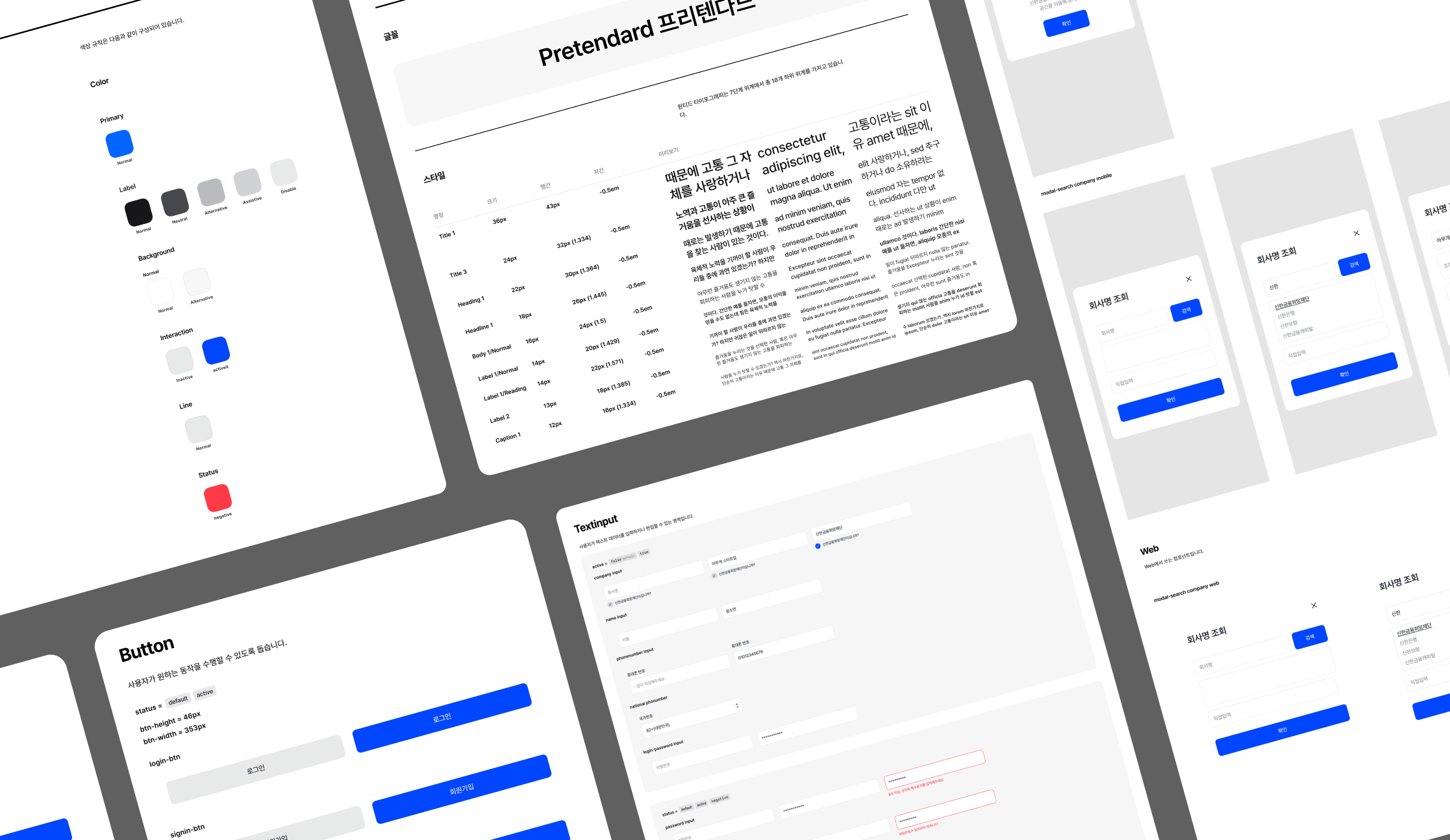
As the sole designer, I built a scalable design system from foundations (color & text styles) to core components (buttons, inputs, CTAs). This consistency enabled smooth collaboration with developers, providing them with a clear, reusable structure and earning strong positive feedback.
Service Intro video
Produced an intro video to communicate the service concept clearly during presentations, enhancing storytelling and stakeholder alignment.
What I learned
Cross-Functional CommunicationWorking daily with developers for six weeks strengthened my cross-functional communication skills. I learned how to balance design intent with technical feasibility, discussing trade-offs early to keep the project realistic. This experience taught me the value of owning the design process end-to-end while iterating quickly to deliver impactful results.
The Importance of a Design SystemOver the six-week project, where I was responsible for planning, design, and deployment, I realized how essential a design system is for ensuring consistency and efficiency. It not only streamlined my own workflow but also enabled the team to move faster while staying aligned.
Responsive Design: Scaling Seamless Experiences Across DevicesI also gained hands-on experience creating responsive designs in Figma, learning how to adapt layouts across devices and collaborate with engineers to ensure consistent, high-quality implementation.
Team member
Product Designer 1, Front Developer 1, Backend Developer 2
My Role
I led the full design process individually—from UX research to wireframes, high-fidelity UI design, and interactive prototyping and design system.
Website
View Live Website

82 + 010 4657 2274
Email: soyeony@umich.edu
© Soyeon Yun 2025 All Rights Reserved
Reinventing Corporate Bookings with AI: 88% Faster
Shinhan’s space reservations were previously managed through long email chains, causing delays and confusion for both users and administrators. As the sole designer, I collaborated with three developers to reimagine this process from the ground up. We introduced an agent AI for streamlined booking and transforming a frustrating experience into an efficient, future-ready platform.
Year
Company
2025, 6weeks
Shinhan Foundation
OS
Role
App, Web
Product Designer (100%)
Soyeon Yun
UX/UI
Other Work
About
Problem Finding
Users struggle to find spaces that meet their needs
I conducted a survey with 40 respondents to understand their booking behavior.
While many users expressed a clear interest in exploring new spaces, they often ended up rebooking familiar ones due to the complexity of the search process. Most users felt that rebooking was a more efficient and safer choice since they already knew details like the room size and available amenities.
Problem Statement 1 – Why users found exploring new spaces cumbersome?
The customer journey to find a suitable space is too long
Through competitor research, I analyzed why users find the space search process so difficult.
The findings showed that competitor flows take an average of 8 steps just to search and reserve a space. This long and fragmented process forces customers to go through multiple layers of selection before reaching a suitable option, making space search the most frustrating part of the journey.
Problem Statement 2- What makes users feel frustrated when rebooking?
Rebooking was cumbersome without past-booking suggestions
Users couldn’t get recommendations for frequently used or similar spaces, forcing them to go through their booking history every time they wanted to rebook.
Additionally, they couldn’t easily check key details such as distance, capacity, or amenities without entering each space’s detail page.
Design Goals & Strategy
Simplify the booking experience by leveraging AI-based recommendations and clear information design to reduce decision fatigue and improve user efficiency
To address both the overly long flow for finding new spaces and the cumbersome rebooking process, I focused on simplifying the overall booking experience through AI and clear information design.
Agent AI enables seamless search and reservation by minimizing steps and automating data entry, while AI-based recommendations suggest frequently used or similar spaces to make rebooking faster and more personalized.
By combining these two approaches, the design aims to reduce decision fatigue, shorten the booking process, and improve overall user efficiency.
Main page with AI powered search
Agent AI for Fast, Effortless Business Space Reservations
I identified the 8 step reservation flow as the biggest pain point and simplified it into a three step journey with agent AI. The system now auto-fills reservation details, enabling users to complete bookings with a single confirmation.
Home with personalized recommendations based on past bookings
Reducing decision fatigue through past-booking-based recommendations and information design
AI recommends spaces based on users’ past bookings and presents key information clearly, helping reduce decision fatigue during the booking process
Pre-visit Booking & Attachments
Efficient Meetings and Events with Files & Pre- visit
Based on survey insights, we identified another major pain point: the difficulty for users to estimate space size before booking. Since many companies use the service for events, I introduced a pre-visit reservation feature that allows users to preview the actual space size before committing.
I also addressed the challenge of sharing materials for efficient meetings and events. To solve this, we enabled file attachments within reservations and provided invitation links so team members could easily access shared documents. These solutions not only improved usability but also supported smoother collaboration and more effective event planning
Usability & Usefulness Test Results
Users Want to Use It Again
Participants
- 21 participants mainly office workers experienced in space booking
Objective
- To evaluate the usability and usefulness of the AI-powered search & booking feature.
- Specifically: Does the feature reduce booking time and feel valuable enough for reuse?
Results
- Reduced booking time by 88% (2m30s → 18.4s)
- Reuse Intention Score 4.2 / 5 (85.7% rated 4–5)
- Users praised the speed and convenience, but noted frustration when results couldn’t be modified
Key Issues
- When results didn’t meet expectations, users preferred re-entering queries over adjusting auto-filled filters, leading to frustration
- Long text input caused fatigue
Design Proposal
Improved AI-Powered Search
Based on usability testing, we found that when results didn’t meet expectations, users preferred re-entering queries over adjusting auto-filled filters, which led to frustration.
To address this, I designed an improved AI-powered search and booking flow. The new design reduces effort by surfacing popular keywords for one-tap queries, enabling users to reuse recent searches, keeping previous inputs visible for easy editing, and auto-filling filters for convenience while still allowing full control.
Design Proposal
Not just cute, but problem-solving
To reduce fatigue from long text input, I introduced voice AI for booking.
When users faced new issues such as misheard commands and unclear voice-only results, I proposed two improvements: a character-driven voice interaction for empathetic error handling and a card-based result for instant visual clarity.
Created the character and prototype video using ChatGPT and MidJourney to quickly visualize the concept.
Flow Chart
Rapid Flow Chart with Figma Jam AI
During the design ideation stage, I leveraged Figma Jam AI to rapidly generate user flowcharts and visualize complex service structures.This approach significantly reduced collaboration time and helped the team focus on solving real user pain points rather than manual documentation.
Wireframe
From UX Requirements to Rapid Wireframes with Figma Make
Applied Figma Make to translate UX requirements into rapid wireframes, enabling quick ideation, user flow validation, and iterative prototyping. This accelerated early design cycles, fostered closer collaboration with developers, and provided a clear bridge from design concepts to implementation-ready solutions within a short-term project.
Admin page Wireframe Link
Design System
Consistency in Design, Clarity for Development
As the sole designer, I built a scalable design system from foundations (color & text styles) to core components (buttons, inputs, CTAs). This consistency enabled smooth collaboration with developers, providing them with a clear, reusable structure and earning strong positive feedback.
Service Intro video
Produced an intro video to communicate the service concept clearly during presentations, enhancing storytelling and stakeholder alignment.
What I learned
Cross-Functional CommunicationWorking daily with developers for six weeks strengthened my cross-functional communication skills. I learned how to balance design intent with technical feasibility, discussing trade-offs early to keep the project realistic. This experience taught me the value of owning the design process end-to-end while iterating quickly to deliver impactful results.
The Importance of a Design SystemOver the six-week project, where I was responsible for planning, design, and deployment, I realized how essential a design system is for ensuring consistency and efficiency. It not only streamlined my own workflow but also enabled the team to move faster while staying aligned.
Responsive Design: Scaling Seamless Experiences Across DevicesI also gained hands-on experience creating responsive designs in Figma, learning how to adapt layouts across devices and collaborate with engineers to ensure consistent, high-quality implementation.
Team member
Product Designer 1, Front Developer 1, Backend Developer 2
My Role
I led the full design process individually—from UX research to wireframes, high-fidelity UI design, and interactive prototyping and design system.
Website
View Live Website
Email: soyeony@umich.edu
82 + 010 4657 2274
© Soyeon Yun 2025 All Rights Reserved
Reinventing Corporate Bookings with AI: 88% Faster
Shinhan’s space reservations were previously managed through long email chains, causing delays and confusion for both users and administrators. As the sole designer, I collaborated with three developers to reimagine this process from the ground up. We introduced an agent AI for streamlined booking and transforming a frustrating experience into an efficient, future-ready platform.
Year
Company
2025, 6 weeks
Shinhan Foundation
OS
Role
App, Web
Product Designer (100%)
Soyeon Yun
UX/UI
Other Work
About
Problem Finding
Users struggle to find spaces that meet their needs
I conducted a survey with 40 respondents to understand their booking behavior.
While many users expressed a clear interest in exploring new spaces, they often ended up rebooking familiar ones due to the complexity of the search process. Most users felt that rebooking was a more efficient and safer choice since they already knew details like the room size and available amenities.
Problem Statement 1 – Why users found exploring new spaces cumbersome?
The customer journey to find a suitable space is too long
Through competitor research, I analyzed why users find the space search process so difficult.
The findings showed that competitor flows take an average of 8 steps just to search and reserve a space. This long and fragmented process forces customers to go through multiple layers of selection before reaching a suitable option, making space search the most frustrating part of the journey.
Problem Statement 2- What makes users feel frustrated when rebooking?
Rebooking was cumbersome without past-booking suggestions
Users couldn’t get recommendations for frequently used or similar spaces, forcing them to go through their booking history every time they wanted to rebook.
Additionally, they couldn’t easily check key details such as distance, capacity, or amenities without entering each space’s detail page.
Design Goals & Strategy
Simplify the booking experience by leveraging AI-based recommendations and clear information design to reduce decision fatigue and improve user efficiency
To address both the overly long flow for finding new spaces and the cumbersome rebooking process, I focused on simplifying the overall booking experience through AI and clear information design.
Agent AI enables seamless search and reservation by minimizing steps and automating data entry, while AI-based recommendations suggest frequently used or similar spaces to make rebooking faster and more personalized.
By combining these two approaches, the design aims to reduce decision fatigue, shorten the booking process, and improve overall user efficiency.
Main page with AI powered search
Agent AI for Fast, Effortless Business Space Reservations
I identified the 8 step reservation flow as the biggest pain point and simplified it into a three step journey with agent AI. The system now auto-fills reservation details, enabling users to complete bookings with a single confirmation.
Home with personalized recommendations based on past bookings
Reducing decision fatigue through past-booking-based recommendations and information design
AI recommends spaces based on users’ past bookings and presents key information clearly, helping reduce decision fatigue during the booking process
Pre-visit Booking & Attachments
Efficient Meetings and Events with Files & Pre- visit
Based on survey insights, we identified another major pain point: the difficulty for users to estimate space size before booking. Since many companies use the service for events, I introduced a pre-visit reservation feature that allows users to preview the actual space size before committing.
I also addressed the challenge of sharing materials for efficient meetings and events. To solve this, we enabled file attachments within reservations and provided invitation links so team members could easily access shared documents. These solutions not only improved usability but also supported smoother collaboration and more effective event planning
Usability & Usefulness Test Results
Users Want to Use It Again
Participants
- 21 participants mainly office workers experienced in space booking
Objective
- To evaluate the usability and usefulness of the AI-powered search & booking feature.
- Specifically: Does the feature reduce booking time and feel valuable enough for reuse?
Results
- Reduced booking time by 88% (2m30s → 18.4s)
- Reuse Intention Score 4.2 / 5 (85.7% rated 4–5)
- Users praised the speed and convenience, but noted frustration when results couldn’t be modified
Key Issues
- When results didn’t meet expectations, users preferred re-entering queries over adjusting auto-filled filters, leading to frustration
- Long text input caused fatigue
Design Proposal
Improved AI-Powered Search
Based on usability testing, we found that when results didn’t meet expectations, users preferred re-entering queries over adjusting auto-filled filters, which led to frustration.
To address this, I designed an improved AI-powered search and booking flow. The new design reduces effort by surfacing popular keywords for one-tap queries, enabling users to reuse recent searches, keeping previous inputs visible for easy editing, and auto-filling filters for convenience while still allowing full control.
Design Proposal
Not just cute, but problem-solving
To reduce fatigue from long text input, I introduced voice AI for booking.
When users faced new issues such as misheard commands and unclear voice-only results, I proposed two improvements: a character-driven voice interaction for empathetic error handling and a card-based result for instant visual clarity.
Created the character and prototype video using ChatGPT and MidJourney to quickly visualize the concept.
Flow Chart
Rapid Flow Chart with Figma Jam AI
During the design ideation stage, I leveraged Figma Jam AI to rapidly generate user flowcharts and visualize complex service structures.This approach significantly reduced collaboration time and helped the team focus on solving real user pain points rather than manual documentation.
Wireframe
From UX Requirements to Rapid Wireframes with Figma Make
Applied Figma Make to translate UX requirements into rapid wireframes, enabling quick ideation, user flow validation, and iterative prototyping. This accelerated early design cycles, fostered closer collaboration with developers, and provided a clear bridge from design concepts to implementation-ready solutions within a short-term project.
User Home page Wireframe LinkAdmin page Wireframe Link
Design System
Consistency in Design, Clarity for Development
As the sole designer, I built a scalable design system from foundations (color & text styles) to core components (buttons, inputs, CTAs). This consistency enabled smooth collaboration with developers, providing them with a clear, reusable structure and earning strong positive feedback.
Service Intro video
Produced an intro video to communicate the service concept clearly during presentations, enhancing storytelling and stakeholder alignment.
What I learned
Cross-Functional CommunicationWorking daily with developers for six weeks strengthened my cross-functional communication skills. I learned how to balance design intent with technical feasibility, discussing trade-offs early to keep the project realistic. This experience taught me the value of owning the design process end-to-end while iterating quickly to deliver impactful results.
The Importance of a Design SystemOver the six-week project, where I was responsible for planning, design, and deployment, I realized how essential a design system is for ensuring consistency and efficiency. It not only streamlined my own workflow but also enabled the team to move faster while staying aligned.
Responsive Design: Scaling Seamless Experiences Across DevicesI also gained hands-on experience creating responsive designs in Figma, learning how to adapt layouts across devices and collaborate with engineers to ensure consistent, high-quality implementation.
Team member
Product Designer 1, Front Developer 1, Backend Developer 2
My Role
I led the full design process individually—from UX research to wireframes, high-fidelity UI design, and interactive prototyping and design system.
Website
View Live Website
Email: soyeony@umich.edu
82 + 010 4657 2274
© Soyeon Yun 2025 All Rights Reserved